Does Calendly have meeting polls? Yes, on every plan
Yes. Calendly has a built-in Meeting Polls feature, and it is available on all plans, including the free one (checked July 2026 on Calendly's own help center). You propose a set of times, invitees vote on them through a link without needing a Calendly account, and you book the winning slot.
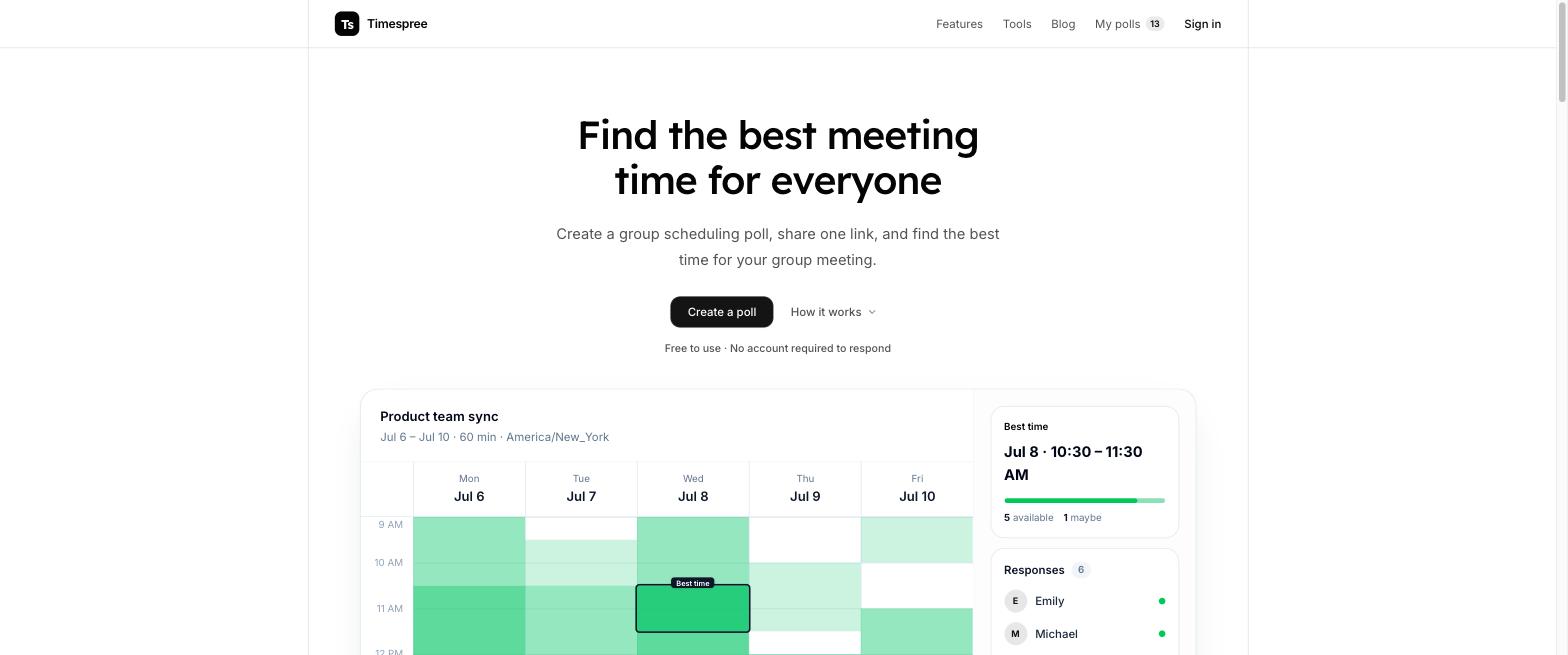
That direct answer hides an important design choice, though. Calendly Meeting Polls use a propose-and-vote model: the organizer decides which times are on the ballot, and participants can only vote on those. It is not an availability heatmap like When2meet or Timespree, where every participant paints everything that works for them and the tool reveals the overlap.
That difference decides whether Calendly's feature is the right tool for your situation, so this article covers both: how to use Meeting Polls well, and when a group availability poll will get you to a booked meeting faster. If you are weighing Calendly against a dedicated group tool, our Calendly alternative guide has the full comparison.
How Calendly Meeting Polls work
The flow has three roles baked in: one organizer, a set of proposed times, and voters.
- The organizer proposes times. You pick specific candidate slots from your calendar, up to 40 of them. Calendly flags conflicts with your existing events while you pick, which is a genuinely nice touch.
- Invitees vote. Anyone with the poll link can vote on the proposed times. Voters do not need a Calendly account, which keeps friction low for external contacts.
- The organizer books the winner. Once the votes are in, you select the time that works best and Calendly sends proper calendar invites to everyone, the same way a normal Calendly booking does.
The finish is the strongest part. Because the poll lives inside Calendly, the winning time turns into a real calendar event with invites, rather than a screenshot of a grid that someone still has to act on.
The start is the weakest part. You, the organizer, must guess which slots have a chance before you have seen anyone's availability. With two or three invitees that is easy. With a group of twelve people across time zones, it is a shot in the dark, and there is no way for a participant to say "none of these work, but Thursday morning does."
How to create a Calendly meeting poll, step by step
Creating one takes a couple of minutes (steps checked against Calendly's help docs, July 2026):
- 1. Log in to Calendly and create a new Meeting Poll from the event creation menu. Polls are available on every plan, so a free account works.
- 2. Name the poll and set the meeting length, for example a 30 minute project kickoff.
- 3. Pick the candidate time slots. You select the specific times you are willing to meet, up to 40 slots. Calendly shows conflicts from your connected calendar while you choose, so you will not propose a time you cannot make.
- 4. Share the poll link by email or chat. Invitees open it, see the proposed times in their own time zone, and vote for everything that works for them. No account needed on their side.
- 5. Watch votes come in and book the winner. Calendly shows you a tally of votes per slot. You pick the final time, and Calendly emails calendar invites to every voter.
What invitees see is clean and professional: a Calendly-branded page listing your proposed slots, with checkmarks to vote. It looks like the Calendly booking pages many business contacts already know, which is part of the appeal if you schedule externally.
Where Calendly Meeting Polls shine
Used for the right job, the feature is genuinely good:
- You already live in Calendly. If your booking links, calendar connections, and buffer rules are all in Calendly, polls slot into the same workflow and respect the same calendar conflicts.
- Professional external scheduling. Sales calls, interviews, client kickoffs. The polished, branded voting page signals professionalism in a way a bare grid does not.
- One organizer, a handful of invitees. With 3 to 6 busy professionals, proposing a shortlist of times is usually faster than asking everyone to paint a full week of availability.
- A real booking at the end. The winner becomes an actual calendar event with invites, automatically.
If that describes your situation, use it. There is no reason to add another tool when the one you pay for, or even Calendly's free tier, already covers it.
The honest limits
Everything below is from Calendly's own documentation, checked July 2026:
- 40 time slots and 40 participants maximum. Fine for a client call, tight for a club, class, or large team event.
- No new time slots after publishing. If the votes show that none of your proposals work, you cannot extend the poll with better options; you start over with a new poll.
- No rescheduling. Once you book the winning time, moving the meeting is not supported through the poll.
- No workflows. Calendly's automated reminders and follow-ups do not run on poll meetings.
- Participants are tied to your proposals. This is the structural one. Voters can only react to the slots you offered. A participant who is free all of Wednesday, when you only proposed Monday and Tuesday, has no way to tell you.
That last limit is why propose-and-vote breaks down with messy group schedules. The organizer must guess good slots before seeing anyone's availability, and every wrong guess costs a slot on the ballot. An availability heatmap inverts this: everyone paints their real availability first, and the best time emerges from the data instead of from the organizer's guesswork. Rallly and Doodle share the same propose-and-vote tradeoff, which is worth knowing before you pick any of the three.
One more note on cost: Meeting Polls themselves are free, but Calendly's paid tiers (Standard from $10 per seat per month billed annually, Teams from $16, checked July 2026) gate other things you may want around them, like multiple event types and team features.
Calendly Meeting Polls vs availability grid tools
Here is how Calendly's poll feature compares with the grid-based tools people usually mean when they search for a scheduling poll. Details checked July 2026.
| Tool | Model | Free tier | Respond without signup | Calendar sync | Mobile |
|---|---|---|---|---|---|
| Calendly Meeting Polls | Propose times, invitees vote | Yes, on all plans (40 slots, 40 participants) | Yes, voters need no account | Organizer side (conflicts flagged) | Yes |
| Timespree | Availability grid heatmap | Free, unlimited participants | Yes | Free for respondents: Google, Outlook, Apple | Yes, mobile-first grid |
| When2meet | Availability grid heatmap | Free | Yes, per-event name sign-in | No | Barely, non-responsive grid |
| Timeful | Availability grid heatmap | Free, open source | Yes | Google, Outlook, Apple Calendar shown while responding | Yes |
When to use which
The decision is less about which tool is better and more about which model fits the meeting:
- Use Calendly Meeting Polls when you already run your scheduling through Calendly, the invitees are external business contacts, the group is small, and you can confidently shortlist a few times. The branded page and automatic invites are worth it there.
- Use a free availability grid poll when the group is larger or the schedules are messy: study groups, classes, club meetings, volunteer shifts, cross-team syncs, friends planning a trip. Painting availability on a grid takes each person under a minute, nobody needs an account, and the heatmap shows overlap you would never have thought to propose.
Timespree is built for that second case. Respondents open a link and paint their availability on a mobile-friendly grid, with no account required and no participant limit. Everyone sees the grid in their own time zone automatically, which matters for the across time zones problem. While responding, participants can overlay their busy times from Google Calendar, Outlook, or Apple Calendar for free, so the availability people enter is real, not remembered. The organizer gets an email as responses arrive and books the darkest cell.
If you are weighing more options, our roundup of the best When2meet alternatives covers seven tools across both models.
