The short answer
The best Rallly alternative for most groups is Timespree. Instead of Rallly's propose-and-vote flow, Timespree uses a free availability heatmap: everyone paints when they are free on a grid, and the darkest cells show the overlap. Calendar import (Google, Outlook, Apple), named event-zone handling with converted slot details, and email notifications are included at no cost, while on Rallly calendar connections sit behind the Pro plan, at $56 per year (checked July 2026).
But the honest version of this comparison is not "one tool good, other tool bad." Rallly and Timespree implement two genuinely different scheduling models, and each model wins in different situations. Rallly is also open source and self-hostable, which for some teams is not a nice-to-have but the whole requirement.
This article explains both models, shows where each one breaks, and compares the tools feature by feature so you can pick based on how your group actually schedules.
Two models: propose-and-vote vs availability heatmap
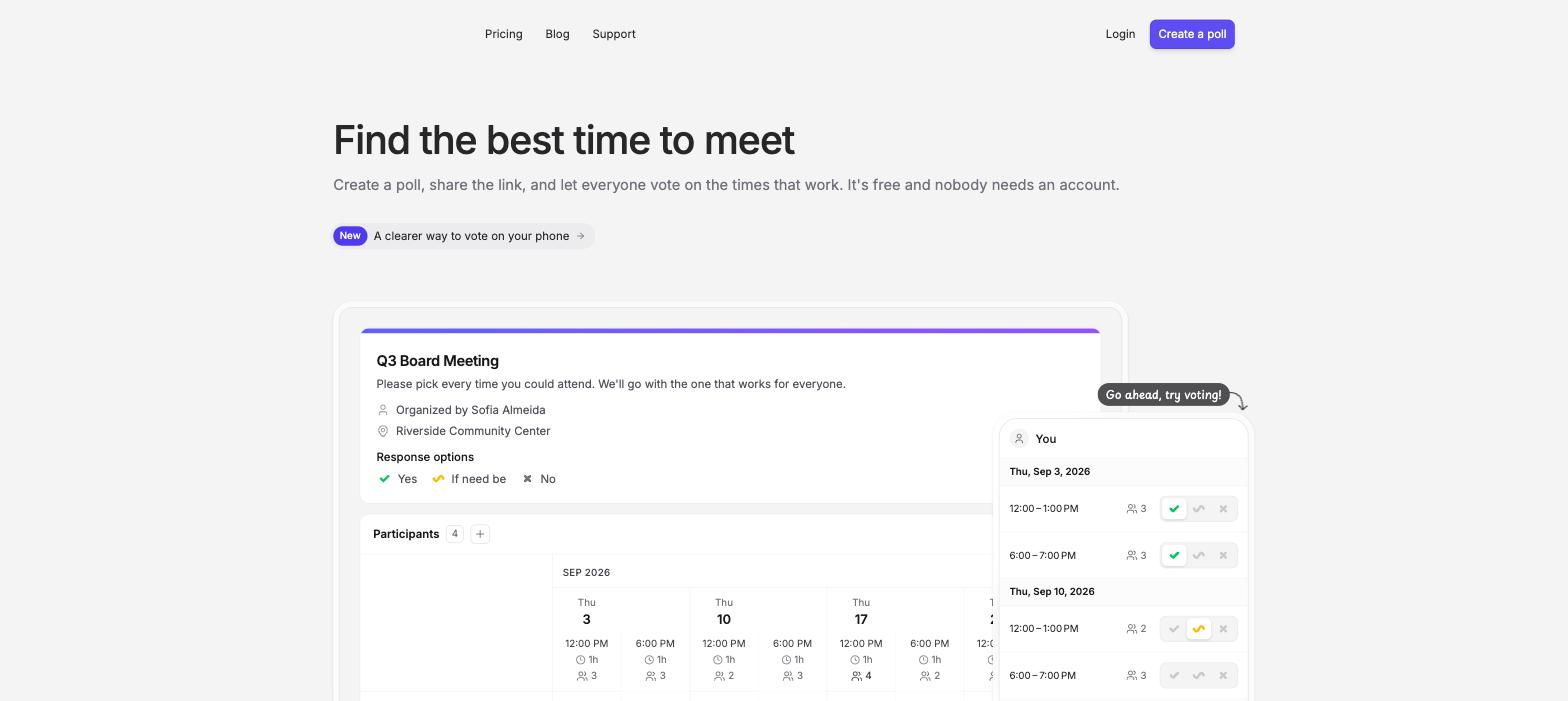
Rallly's model: propose and vote. The organizer picks a handful of candidate times up front. Participants vote on each option: yes, no, or if-need-be. The option with the best votes wins. It is essentially a structured ballot about times.
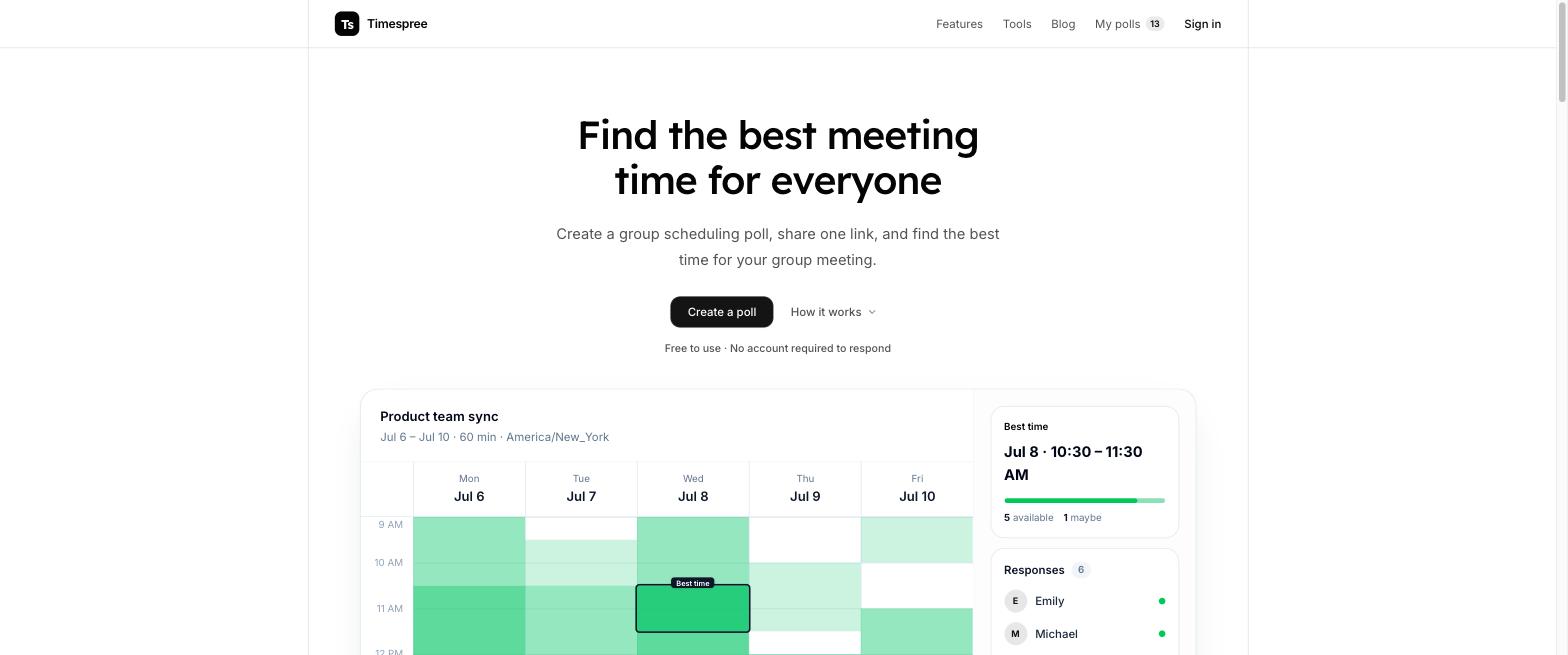
Timespree's model: availability heatmap. The organizer picks a date range and time window. Participants paint every slot they could make on a grid. The overlapping availability shows up as a heatmap, and the organizer picks from the darkest cells. It is the When2meet model, and we explain it in depth in our group availability poll guide.
The difference sounds cosmetic. It is not. The propose-and-vote model asks the organizer to guess good options before knowing anyone's schedule. The heatmap model collects full availability first and lets the best time emerge from the data. Which is better depends entirely on how constrained the decision already is, which is the next section.
When each model wins
Propose-and-vote (Rallly) wins when the options are already few and clear.
- Choosing between two or three specific dates for an event ("the offsite is June 12, June 19, or June 26")
- Whole-day decisions where times of day do not matter
- Formal groups where a visible vote helps the decision feel legitimate
- Situations where the organizer genuinely cannot offer flexibility, so voting on the allowed options is the whole exercise
Availability heatmap (Timespree) wins when schedules are messy.
- Finding a 1-hour slot in a normal working week across 6 people: there are dozens of plausible slots, and no organizer can guess the right 3 to propose
- Groups spanning time zones, where a "good" candidate time for one region is terrible for another
- Recurring meetings, study groups, band practice: anything where you want to see the whole shape of the week
- Any situation where the first round of voting would end in "none of these work, propose new options," which is the propose-and-vote failure mode
A useful rule of thumb: if you can list every reasonable option on one hand, vote on them with Rallly. If you would be guessing, collect availability on a grid instead. For the full technique, see how to find a meeting time that works for everyone.
Timespree vs Rallly: feature by feature
Here is the side-by-side. Pricing and features checked July 2026.
| Feature | Timespree | Rallly |
|---|---|---|
| Scheduling model | Availability heatmap grid | Propose times, vote yes/no/if-need-be |
| Price | Free | Free tier; Pro at $56/yr |
| Open source | No | Yes |
| Self-hostable | No | Yes |
| Account needed to respond | No | No |
| Calendar connections | Google, Outlook, Apple Calendar import, free | Paid (Pro) |
| Time zone handling | Named event zone plus converted details | Yes |
| Notifications to organizer | Email, free | Yes; some features gated to Pro |
| Works on mobile | Yes, mobile-first grid | Yes |
| Participant limits | None | Free tier is generous |
| Best for | Messy schedules, cross-time-zone groups | Few clear options, self-hosters |
Rallly's real strength: open source and self-hosting
This deserves its own section because it is the reason many people choose Rallly, and it is a strength Timespree does not match.
Rallly is fully open source with an active repository and a real self-hosting story: you can run the whole product on your own server. That matters in several concrete cases:
- Data residency and compliance. Some organizations cannot send scheduling data (which reveals names, availability patterns, and implied org structure) to a third-party service at all.
- Longevity insurance. If the hosted service ever changes or shuts down, a self-hosted instance keeps working and the code remains forkable.
- Institutional policy. Universities, nonprofits, and public bodies often have standing preferences for open source tools.
If any of those describe you, Rallly is probably your answer regardless of the model debate above, and it earns the recommendation. Timeful is the other open source name worth knowing: it is open source (AGPL v3) with a heatmap grid, and it also publishes real self-hosting docs covering Docker Compose and NixOS. We cover it in our best When2meet alternatives roundup.
The trade-off is cost of convenience: on Rallly's hosted cloud, calendar connections and some features require Pro, at $56 per year (checked July 2026), and self-hosting trades that subscription for your own server and maintenance time.
What Timespree adds, and what it costs
Timespree's pitch is simple: the availability heatmap model with the annoying parts removed, free.
- No-account responses. Participants open the link, type a name, paint the grid. No sign-up wall in front of your respondents.
- Free calendar import. While responding, participants can overlay busy times from Google Calendar, Outlook, or Apple Calendar (CalDAV). It never auto-fills without them; it just puts their real schedule under the grid so they stop marking slots they cannot make. On Rallly, calendar connections are a Pro feature.
- Clear time-zone context. The grid keeps the organizer's event zone visible, while participants can choose a display zone for converted slot details. If your group is international, read our guide to scheduling across time zones.
- Email notifications. The organizer gets an email as responses arrive, so there is no refreshing the link to check progress.
- No participant limits. A 40-person poll works the same as a 4-person poll.
The honest trade-offs: Timespree is not open source, and you cannot self-host it. There are no native mobile apps (the web grid is mobile-first and works well on phones), no recurring poll automation, and no automatic video-call creation.
Which one should you pick?
Match the tool to your situation:
Pick Rallly if:
- Open source or self-hosting is a requirement, not a preference
- Your decisions look like "which of these 3 dates": few options, whole days, a clean vote
- You want the yes/no/if-need-be vote record as part of the group's decision process
- You are happy paying $56/yr for Pro if you need calendar connections on the hosted version
Pick Timespree if:
- Your scheduling looks like "find an hour that works for 8 busy people," where proposing options up front is guesswork
- You want calendar import and organizer notifications without a subscription
- Your group spans time zones and you want conversion handled automatically
- You want the When2meet-style workflow your group already understands, minus its problems (see our When2meet alternative guide)
Both are legitimate tools; they are just built for different shapes of decision. If your polls keep ending with "none of these times work," that is the propose-and-vote failure mode, and it is the clearest signal to switch to a heatmap.
